Your First Real Project: Build a To-Do App With AI Help

This Is the Moment It Gets Real
For the past three weeks, we've been building mindset. You understand why coding matters in an AI world, how computers follow instructions, and how human thinking fills the gaps AI leaves behind.
Now we build something.
This week, you'll create a working to-do app — a program that lets you add tasks, mark them as done, and see your list. It's a simple project, but it will teach you more about real software development than any textbook exercise.
And here's the most important part: we're going to use AI as a coding partner — not a cheat code. You'll guide it, question it, fix it, and own the final product.

Why a To-Do App?
The to-do app is one of the most famous beginner projects in software development — and not just because it's simple. It's because it contains the DNA of almost every real application:
- ›Creating new data (adding a task)
- ›Reading existing data (showing the list)
- ›Updating data (marking as done)
- ›Deleting data (removing a task)
These four operations — Create, Read, Update, Delete — are called CRUD. Virtually every app you've ever used (Instagram, Gmail, TikTok) is built on CRUD at its core. Learn this pattern once and you'll recognise it everywhere.
We'll also revisit and improve this app in Month 5 when we add AI features and security. So think of it as a project that grows with you.
The Plan Before the Code
This is something professional developers always do, and beginners almost never do: plan before coding.
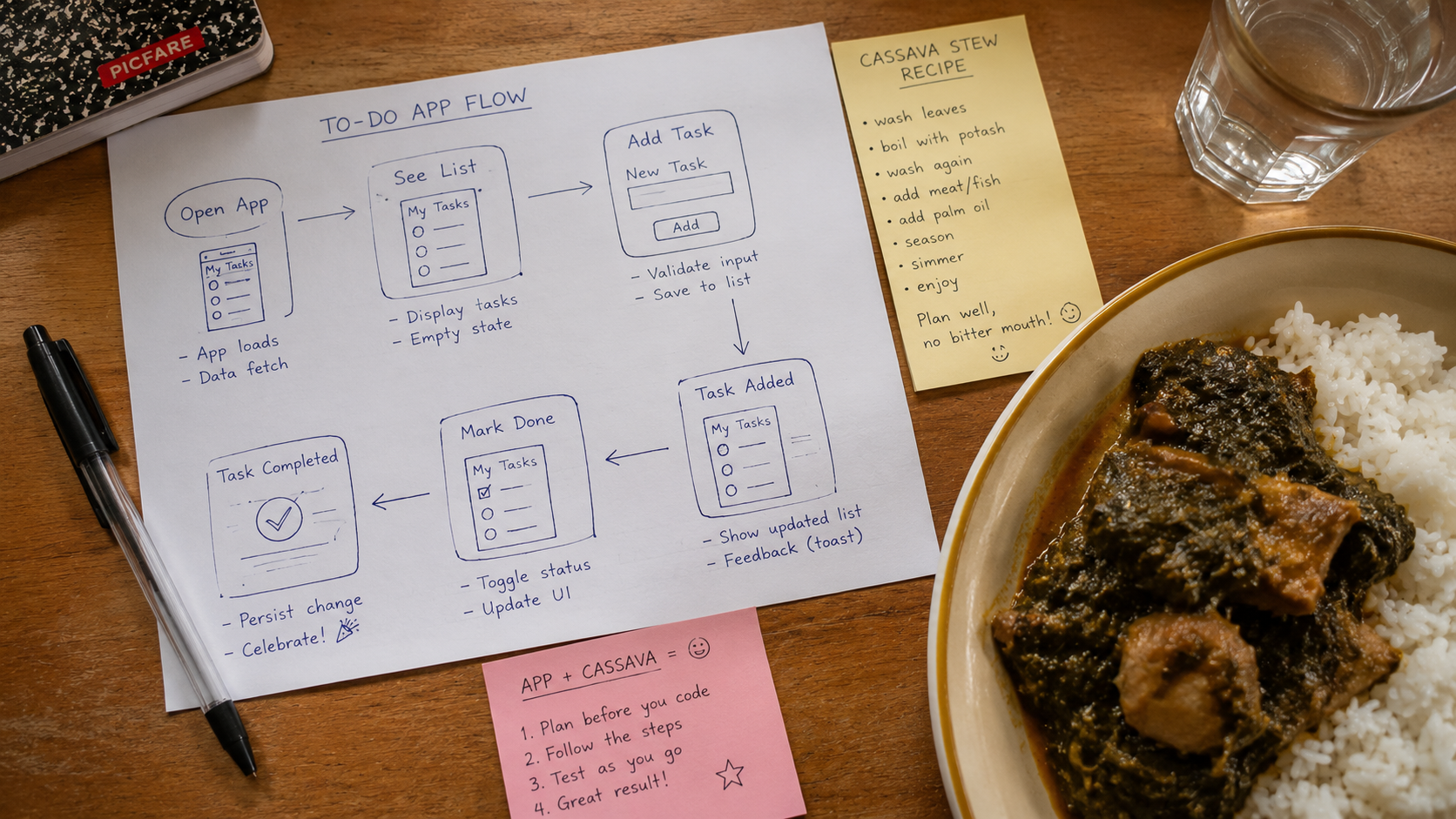
Before you touch a keyboard or talk to an AI, sketch out what your app should do. On paper (yes, actual paper), write:
- ›What can a user do with this app? (Add tasks, mark done, see list, delete tasks)
- ›What information does each task need? (Text of the task, whether it's done or not)
- ›What does the flow look like? (User opens app → sees list → adds task → marks done)
Spend five minutes on this. It doesn't have to be perfect. The act of thinking through the design before coding is a habit that will save you hours of confusion later.
Building With AI: Step by Step
Step 1: Set up your workspace
Go to replit.com and create a free account. Click + Create Repl and choose Python. Name it my-todo-app.
Step 2: Give AI a structured brief — not a lazy request
Don't just say "build me a to-do app". Based on what you planned on paper, write a clear prompt. Here's an example:
"Build a simple command-line to-do app in Python. It should: 1) Show a numbered list of tasks when the program starts, 2) Let the user type 'add' to add a new task, 3) Let the user type a number to mark that task as done, 4) Let the user type 'quit' to exit. Each task should show whether it's done or not. Start with 2 example tasks already in the list."
Notice how specific that is. The more clearly you define the problem, the better the AI's output.
Step 3: Read every line of the AI's code
Paste the code into Replit. Before you run it, read through it. For every line you don't understand, ask the AI:
"Explain line X of that code to me like I'm 15."
Don't skip this step. The goal isn't just a working app — it's understanding what you built.

Step 4: Run it and break it
Run the app. Try normal actions first. Then try to break it:
- ›What happens if you type a letter where a number is expected?
- ›What happens if you mark a task number that doesn't exist?
- ›What happens if you add a task with an empty name?
Step 5: Fix what you found — with AI
For each problem you discovered, tell the AI what happened and ask it to fix it. Notice: you're directing the process. You found the problem, you decided it mattered, you asked for the fix.
Step 6: Add one feature yourself
Ask the AI to add a "delete" feature that lets you remove a task by number. Then try to understand how it works. Bonus challenge: can you add it yourself first, then ask the AI to improve your version?
What You've Actually Built
When you finish, step back. You have:
- ›A working software program that you guided from idea to reality
- ›Experience with CRUD — the backbone of almost every app ever made
- ›Practice catching and fixing bugs through human reasoning
- ›A codebase you'll return to and improve later in this series
You built this. The AI typed fast — but every decision about what to build, how it should behave, and what counted as a problem came from you.

Wrapping Up Month 1
You've just completed the first month of Everyone Can Code. Let's look at what you now know:
- ›Why human coding skills matter more in an AI world, not less
- ›What code is and how computers turn instructions into action
- ›How AI generates code through pattern matching — and where that breaks down
- ›How to work alongside AI as a thinking partner, not a crutch
Month 2 starts next week, and things get exciting. We're going to zoom out from code and look at how software is actually built — servers, databases, APIs, and the architecture behind the apps you use every day.
💡 Month 1 Takeaway: The future belongs to people who can think clearly, define problems well, and build solutions. AI is your fastest tool — but you are the engineer.
Share your to-do app! What did you build? What did you break? What did you learn? Drop a comment below. 👇